Image To PDF Converter
Drop images here
or click to browse
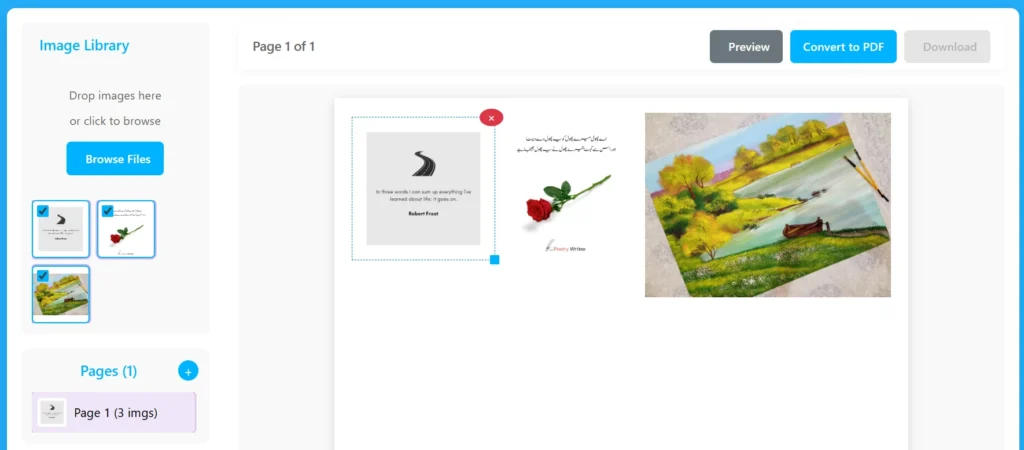
Click on images in the library to add them here or add a new page.
Introduction
Convert your images into a clean, shareable PDF file within seconds. Our free Image to PDF Converter lets you upload photos, scans, screenshots, or documents and turn them into a single, high-quality PDF file without installing any software. Whether you’re a student organizing notes, a designer sharing layouts, or an office professional managing documents, this tool simplifies the process for everyone.
All image processing happens securely on your browser, ensuring that your files remain private and protected. You can upload multiple images, resize or reorder them, and download your PDF instantly. The tool works on Windows, macOS, Android, and iOS, making it accessible from any device with an internet connection.
Use it anytime you need a fast, reliable way to convert JPG, PNG, or other image formats to PDF 100% free and privacy-safe.
Key Features Of Image to PDF Converter Tool
Image Management
Drag & Drop Upload: Easily upload images by dragging them into the upload zone.
Click-to-Browse Option: Select multiple images from your device using the “Browse Files” button.
Thumbnail Preview: Instantly view uploaded images as thumbnails in a scrollable list.
Selectable Thumbnails: Click on images to select or deselect them for PDF pages.
Highlight Feedback: Selected images are visually highlighted with a purple border.
Page Management
Add Multiple Pages: Create multiple PDF pages dynamically using the “+” button.
Page Thumbnails: View all created pages with mini-previews in the sidebar.
Active Page Highlighting: The currently selected PDF page is clearly marked.
Delete Page Option: Remove unwanted pages quickly with a visible delete button.
Automatic Page Count: Real-time update of total pages displayed on the interface.
Canvas and Layout
A4 Canvas Size: Each page uses an accurate A4 (210mm × 297mm) aspect ratio for real PDF proportions.
Drag and Drop Image Placement: Users can click selected images to add them onto the current canvas.
Resizable Images: Each image on the page can be resized with corner handles.
Removable Images: Delete any placed image with a single click on its remove button.
Live Page Preview: Instantly see how the page will look before conversion.
Conversion & Download
Real-Time Conversion: Convert all pages into a single PDF file directly in the browser (client-side).
Preview Before Download: Preview pages before finalizing conversion.
One-Click Download: Instantly download the generated PDF file.
Offline Functionality: Works entirely offline, no server uploads required for conversion.
User Interface & Design
Clean, Modern UI: Minimal and elegant interface with purple theme tones.
Two-Panel Layout: Left side for image & page management, right side for canvas and controls.
Top Action Bar: Quick access to preview, convert, and download buttons.
Responsive Design: Fully mobile-friendly with adaptive layout for small screens.
Hover Effects: Visual feedback for buttons, drop zones, and thumbnails.
Smooth Transitions: Subtle animations and shadows for a polished user experience.
Extra Functionalities
Automatic Scrollbars: Thumbnail and page lists support smooth scrolling for large uploads.
Touch-Friendly on Mobile: Resize and remove buttons remain visible for touch devices.
Error-Free Structure: Organized HTML5 and CSS3 with accessibility-friendly structure.
FontAwesome Icons: Visually enhanced interface with clear and intuitive icons.
No External Dependencies (except fonts/icons): Lightweight and fast to load.
How to Use the Image to PDF Converter?
Creating a PDF from your images takes only a few simple steps. Here’s how to do it:
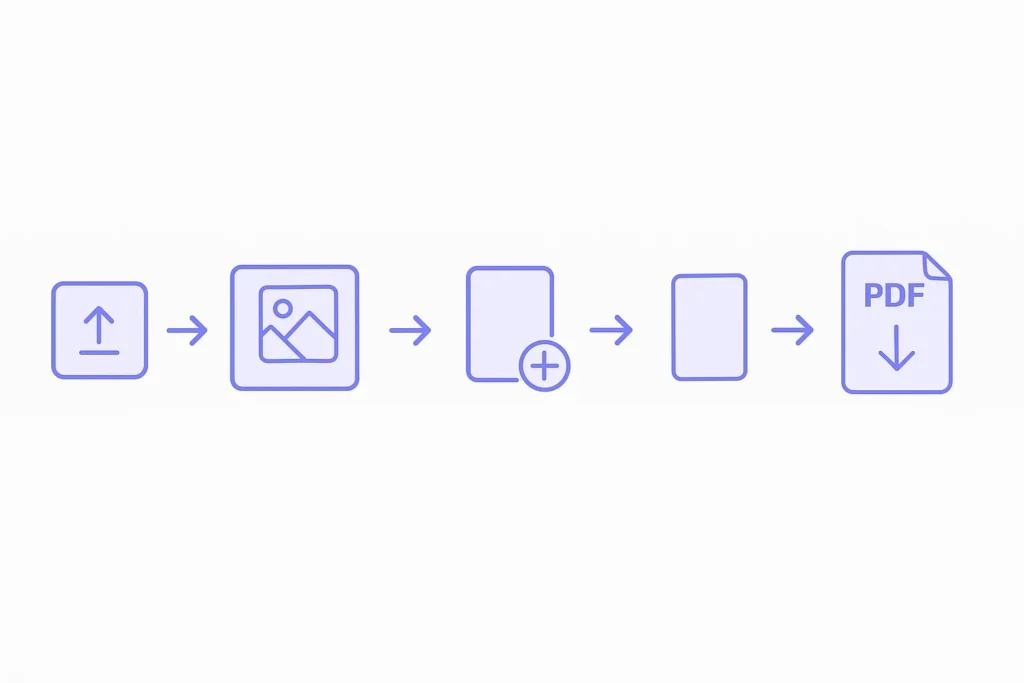
Upload Your Images: Click the upload area or drag and drop your photos directly into the tool.
Preview and Arrange: Once uploaded, preview all images as thumbnails. Drag to reorder or resize them easily.
Add or Remove Pages: Need more space? Add extra pages or delete existing ones as needed.
Adjust Layout: Use the on-screen canvas to position images neatly before converting.
Convert and Download: Click the “Convert to PDF” button and download your new file instantly.
No registration, no hidden fees just a smooth and secure image-to-PDF experience.
Why Choose This Converter
Our Images to PDF Converter stands out because it prioritizes privacy, performance, and accessibility. Everything happens on your device no file uploads, no tracking, and no data storage on servers.
You don’t need to install anything, and it works seamlessly on any browser, including Chrome, Safari, and Firefox. The tool uses smart compression to ensure your PDF retains excellent image quality while keeping file size small.
It’s the perfect solution for anyone who wants fast, reliable, and private image-to-PDF conversion.
Supported Formats
Our converter supports almost every popular image format used today. You can upload JPG, JPEG, PNG, BMP, WEBP, and even HEIC files from your phone or camera.
Whether you’re converting a few photos from your gallery or scanned documents from an office printer, this tool ensures compatibility and quality. It automatically adjusts image orientation and maintains clarity for both color and grayscale pictures.
Just drag, arrange, and convert the tool handles all major image types for a seamless PDF experience.
Try our free popular tools:
FAQs
How can I convert multiple images into one PDF?
Simply drag and drop all your images into the upload area. The tool will list them in order. You can rearrange them before hitting the “Convert to PDF” button. All selected images will merge into one organized PDF file.
Does the tool work offline?
Currently, it runs online, but all conversion happens locally in your browser. That means even though you need internet access to open the tool, your images never leave your computer.
Is my data stored or shared on any server?
No. Your images are processed entirely within your browser. Nothing is uploaded or saved on external servers. Once you close the tab, your files disappear instantly.
Can I reorder pages before conversion?
Yes. You can drag and drop the thumbnails to rearrange the order before converting to PDF. This feature helps organize notes, assignments, or receipts exactly how you want.
Is it compatible with mobile devices?
Yes. The tool is optimized for all screen sizes, including Android and iPhone devices. You can use it directly from your mobile browser without installing an app.
Disclaimer:
This tool runs entirely in your browser to ensure privacy and security. Uploaded images are never stored or transmitted to any server. Use it to convert images to PDF safely, but please verify your files before closing or refreshing the page.