How to Convert Word to PDF Online for Free Without Email?
In an era where digital privacy is increasingly hard to come by, finding a reliable word-to-PDF free online converter without email requirements can feel like a daunting task. Most platforms lure you in with the promise of a free conversion, only to lock your file behind a “sign-up” wall or a “send to email” prompt.
Not only is this time-consuming, but it also exposes your inbox to potential spam. This guide introduces a more modern, secure, and efficient way to handle your documents using a Word to pdf converter tool that operates entirely within your own browser.
The Evolution of File Conversion: Why “No Email” Matters
Traditionally, online converters worked by uploading your file to a remote server, processing it, and then either emailing it to you or providing a temporary download link. This method has two major flaws:
- Security Risks: Uploading files to external servers can put your private data at risk.
- Inbox Clutter: You end up on a marketing list you never wanted to join.
The new standard for document management is client-side conversion. This means the conversion happens inside your web browser (Chrome, Firefox, Safari) without your file ever leaving your computer.
Introducing “Word to PDF Converter Free”
We built this free Word to PDF converter for users who prioritize speed and data sovereignty. Unlike traditional platforms, this tool leverages your browser’s processing power to turn .doc or .docx files into high-quality PDFs instantly.
What are the most Important Key Features of the Word to pdf converter:
- 100% Browser-Based: The conversion engine runs locally in your browser tab.
- No Email Required: You never have to share your personal information or create an account.
- Local Storage Integration: A unique feature that saves your converted files in your browser’s local storage for future access.
- Enhanced Privacy: We process your file directly in your browser without uploading it to any cloud server, so your data stays private and secure.
Step-by-Step Guide: How to Convert Word to PDF Locally
Converting your documents is now a three-click process. Here is how to use a browser-based Word to pdf free online converter without email:
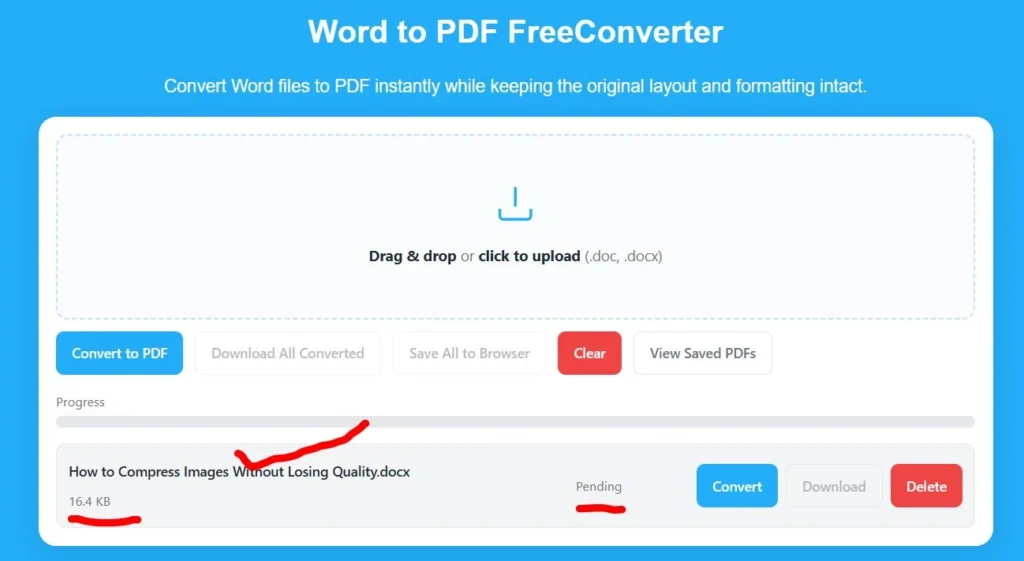
Step 1: Upload Your Document
Open the Word to pdf converter free tool. Drag and drop your Word file into the designated area. Experience near-instant ‘uploads’ with this browser-based tool, which keeps your file securely on your device throughout the process.
Step 2: Instant Local Conversion
Click the “Convert” button. Your browser will execute the script required to reformat the Word document into a PDF. This usually takes less than three seconds, depending on the file size.
Step 3: Save and Access via Local Storage
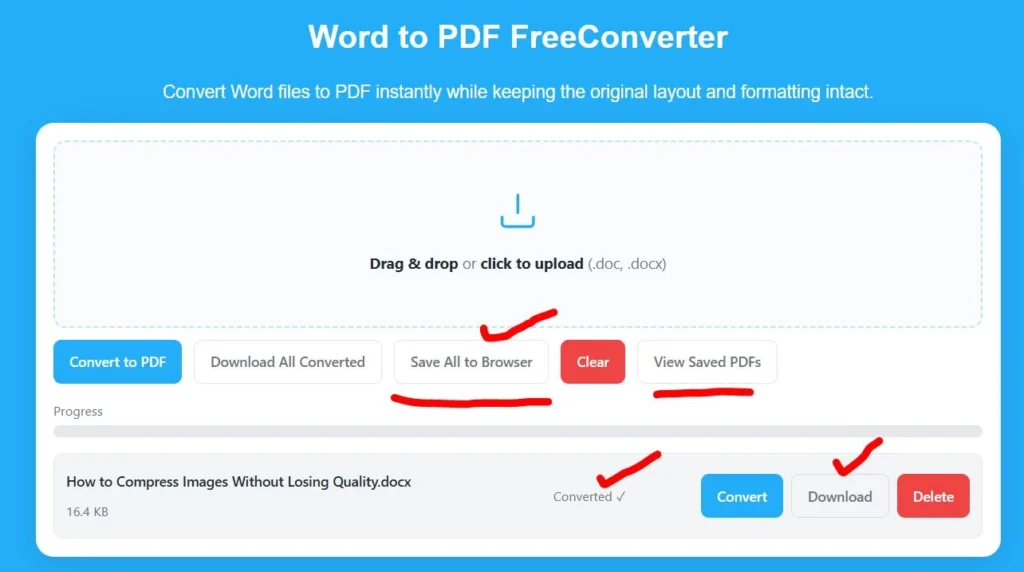
Once the conversion is complete, you can download the file immediately. However, one of the best parts of this specific tool is the Local Storage feature. Even if you accidentally close the tab, the tool saves a copy of the converted file in your browser’s internal memory. You can return to the site later and redownload your document without having to convert it again.
Why Browser-Based Conversion is the Safest Option
When you use a word to pdf free online without email, you are essentially cutting out the middleman. Here is why browser-side processing is superior:
- Zero Server Footprint: There is no “record” of your document on the internet. For legal documents, medical records, or financial statements, this is the only way to go.
- Work Offline: Once the web page is loaded, many browser-based converters can actually work without an active internet connection.
- No Subscription Traps: Because there is no account system, there is no risk of being “nudged” into a paid monthly subscription.
Ready for a private way to manage your documents?
Stop uploading your sensitive files to external servers and skip the email registration. Experience 100% private, browser-side conversion with Word to PDF Converter Free. Convert your files locally and keep them stored in your browser for easy access anytime.
Try Now: https://freeconverter.cloud/word-to-pdf-converter/
Frequently Asked Questions
Is the quality the same as Adobe?
Yes. Modern browser-based conversion engines actively preserve margins, font styles, and high-resolution images, ensuring your PDF matches your Word document exactly.
How does the “Local Storage” feature work?
The tool uses a web technology called IndexedDB or LocalStorage. It creates a small, private space in your browser where the converted file is kept. This is not accessible by other websites or the tool’s developers—only by you through that specific browser.
Can I convert large files?
Yes, most browser-based tools can handle standard document sizes. However, extremely large files (over 100MB) may depend on your computer’s RAM, as the processing happens on your hardware.
Final Verdict: Why You Should Switch
If you are tired of “free” tools that demand your data in exchange for a simple service, it is time to switch to a Word to pdf converter that respects your privacy. By choosing a browser-based, word-to-PDF free converter without email, you get a faster experience, a cleaner inbox, and the peace of mind that your files are never being stored on a random server.
You can also check other Server-Based Word to PDF Converter Tools: iLovePDF.com, Smallpdf.com